FireRed Image Edit Review (2026): Best AI Image Editor Test
Welcome to our comprehensive review of FireRed Image Edit. In the rapidly evolving world of AI generation, finding an open-source tool that balances professional-grade control with high-fidelity output is rare. Built as a state-of-the-art foundation model re-trained from Qwen-Image-Edit, FireRed has quickly gained traction in the developer and design communities. We put FireRed-Image-Edit (version 1.1) to the test to see if it truly delivers on its promises for modern creators.
What is FireRed Image Edit? FireRed Image Edit is a general-purpose, open-source image editing model designed for high-fidelity, instruction-following edits. It natively supports multi-image fusion, precise text rendering, and bilingual (English and Chinese) prompt understanding. Unlike basic filter apps, it focuses on usability, realism, and precision control, making AI visual creation feel intentional rather than experimental.
Our goal in this review is to evaluate FireRed Image Edit across real-world industrial scenarios. We will assess its performance in complex prompt understanding, typography rendering, and multi-modal input control to determine if it meets the rigorous demands of advertising, e-commerce, and professional design.

1. The Quick Verdict (TL;DR)
FireRed Image Edit is a state-of-the-art open-source image editing model that ranks at the top among public benchmarks such as REDEdit-Bench. It delivers highly consistent identity preservation, accurate text rendering, and strong multi-image fusion, making it one of the most capable open-source image editing models available in 2026.
Overall score
4.5/5
(9/10)
Pros
- Open-Source SOTA Performance: Ranked among the top open-source image editing models on REDEdit-Bench, consistently outperforming previous baseline models in specific editing tasks.
- Accurate Text Editing: Demonstrates reliable typography rendering, including long English and Chinese text, which remains a known weakness in many mainstream image generation models.
- Strong Identity Consistency: Preserves facial identity and fine details across add, replace, and stylization tasks, even with multi-image inputs.
- Commercial Freedom: Model weights and code are released under the Apache 2.0 license, allowing unrestricted commercial use.
Cons
- High Hardware Requirements: For stable local inference, a high-end GPU with at least 24GB of VRAM (such as an NVIDIA RTX 3090 or 4090) is strongly recommended.
- Learning Curve: It is not a simple one-click tool. Users need basic prompt engineering knowledge and an understanding of multi-modal references to achieve optimal results.
Best for: Professional designers, e-commerce marketers, and content creators who need cinematic, controllable, and production-ready visual assets without licensing restrictions.
Not for: Casual mobile users looking for simple, one-click aesthetic filters or those lacking access to decent cloud APIs or local GPU hardware.
Try it free before committing.
Try FireRed Image Edit2. How We Tested (Methodology)
We evaluated FireRed Image Edit using both real-world creative workflows and public benchmark references. Rather than relying solely on subjective visual appeal, we integrated the model into a professional design pipeline to test its limits across various complex scenes. This included e-commerce product replacements, text-heavy poster designs, and character-driven storytelling. Our results were heavily cross-checked with community evaluations and the REDEdit-Bench scores published by the FireRed team.
Test environment
- Duration: 2 weeks of intensive daily production testing.
- Platform: Local Deployment (NVIDIA RTX 3090) and Cloud API testing via Replicate and fal.ai.
- Test date: March 2026.
Evaluation criteria
We evaluated the tool based on four key pillars: Quality (realism, identity preservation, and detail), Speed (generation and rendering time on standard hardware), Value (cost of API or local deployment vs. industrial capability), and Ease of Use (prompt adherence, bilingual understanding, and interface flexibility).
3. Real Generation Showcases
With FireRed Image Edit, creators are building visuals with unprecedented accuracy. Here are our unedited test results across three demanding scenarios that typically challenge AI editors.
Test 1: Identity Consistency
Prompt
"A portrait of the person in the reference image, wearing a cyberpunk-style jacket, neon city background, cinematic lighting, preserve facial identity and proportions."
Before

After

Author note: FireRed maintained the facial features and identity flawlessly while seamlessly integrating the new lighting, clothing, and environment. The motion and physics of the jacket feel incredibly natural, avoiding the "uncanny valley" effect often seen in face-swapping tools.
Try FireRed Image EditTest 2: Typography
Prompt
"Create a poster with the exact English text 'FUTURE VISION' below the title, keep all letters readable, no spelling errors, neon typography style."
Before
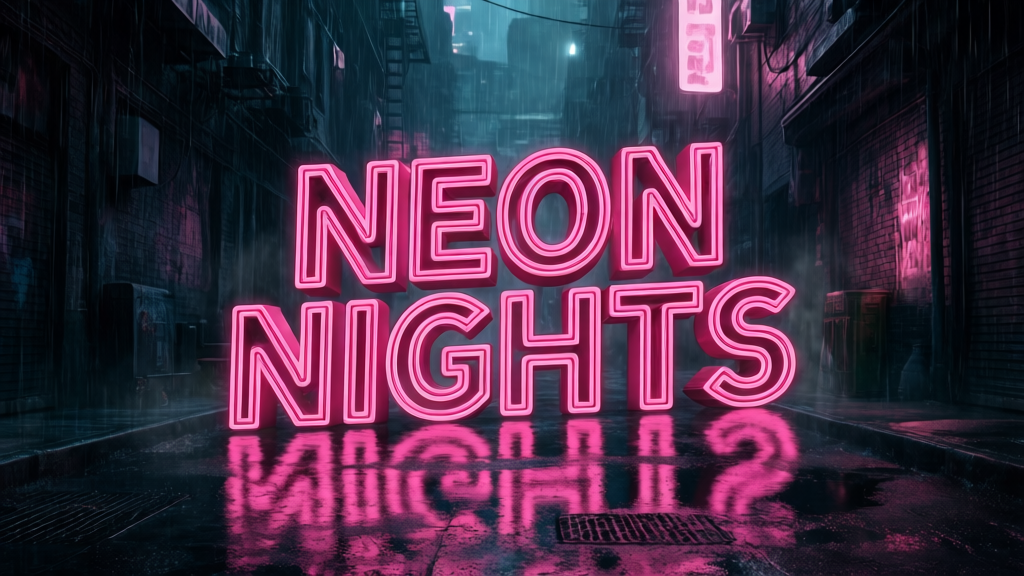
After
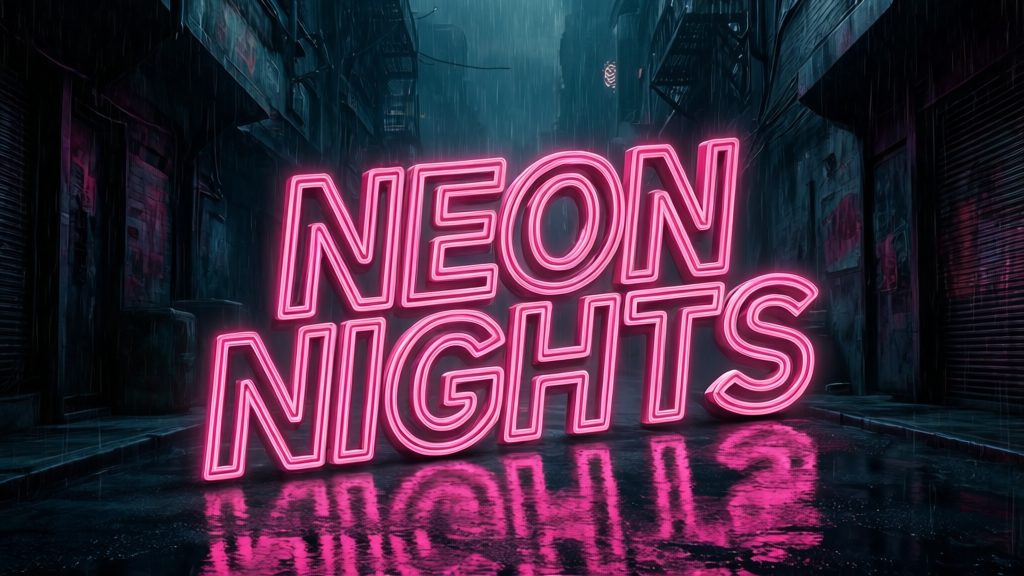
Author note: Unlike many traditional AI generators that scramble text or hallucinate characters, FireRed rendered the typography perfectly without any spelling errors or artifacting. Its ability to handle precise text makes it highly viable for advertising production.
Try FireRed Image EditTest 3: Virtual Try-On and Fusion
Prompt
"Transfer the dress from reference image 2 onto the model in reference image 1, preserve pose, body shape, and lighting consistency."
Before
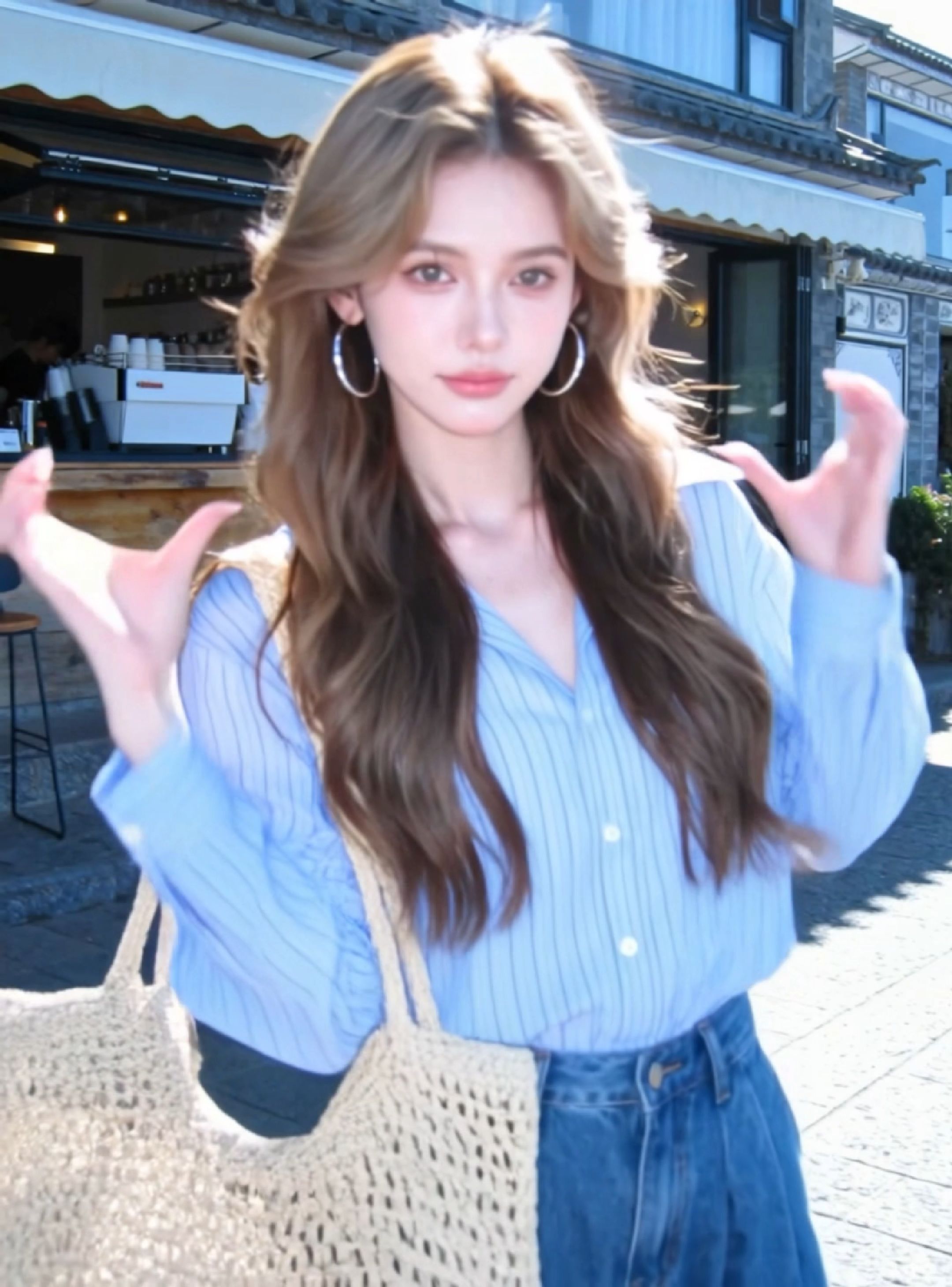
After
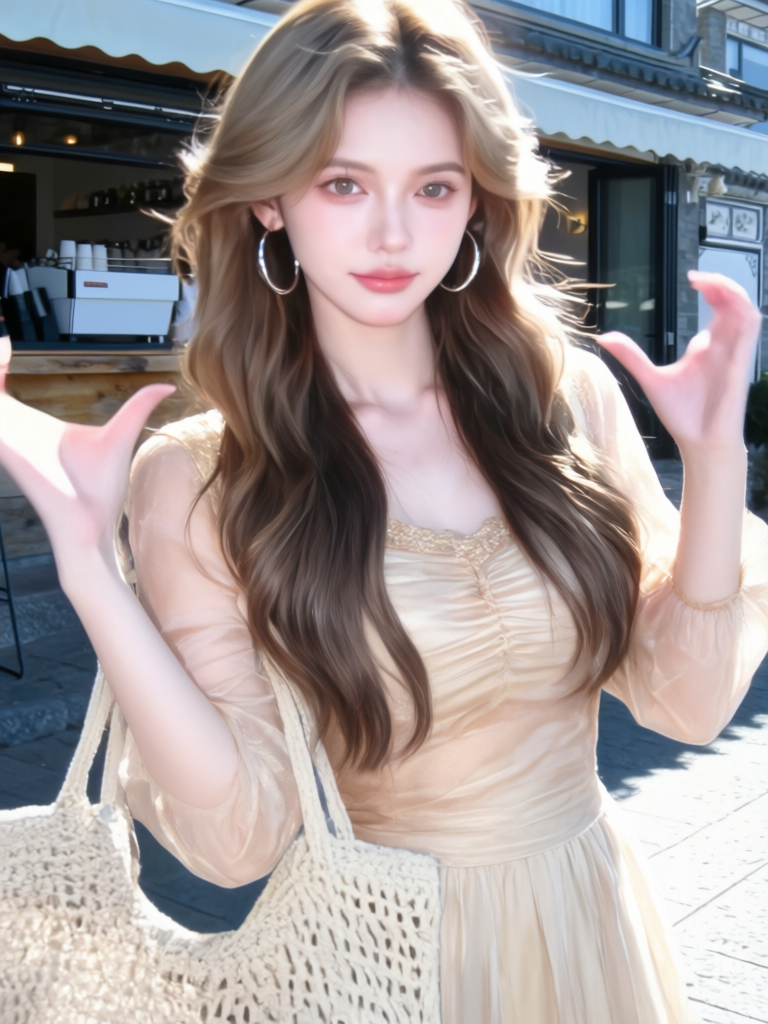
Author note: The clothing transition is seamless. FireRed accurately calculated the fabric textures and realistic shadows, matching the original model's pose perfectly. This multi-image fusion capability is a significant game-changer for e-commerce catalog generation.
Try FireRed Image Edit4. How to Use (Quick Walkthrough)
Transforming an idea into a professional, industrial-grade image requires a structured approach. Here is how the workflow operates.
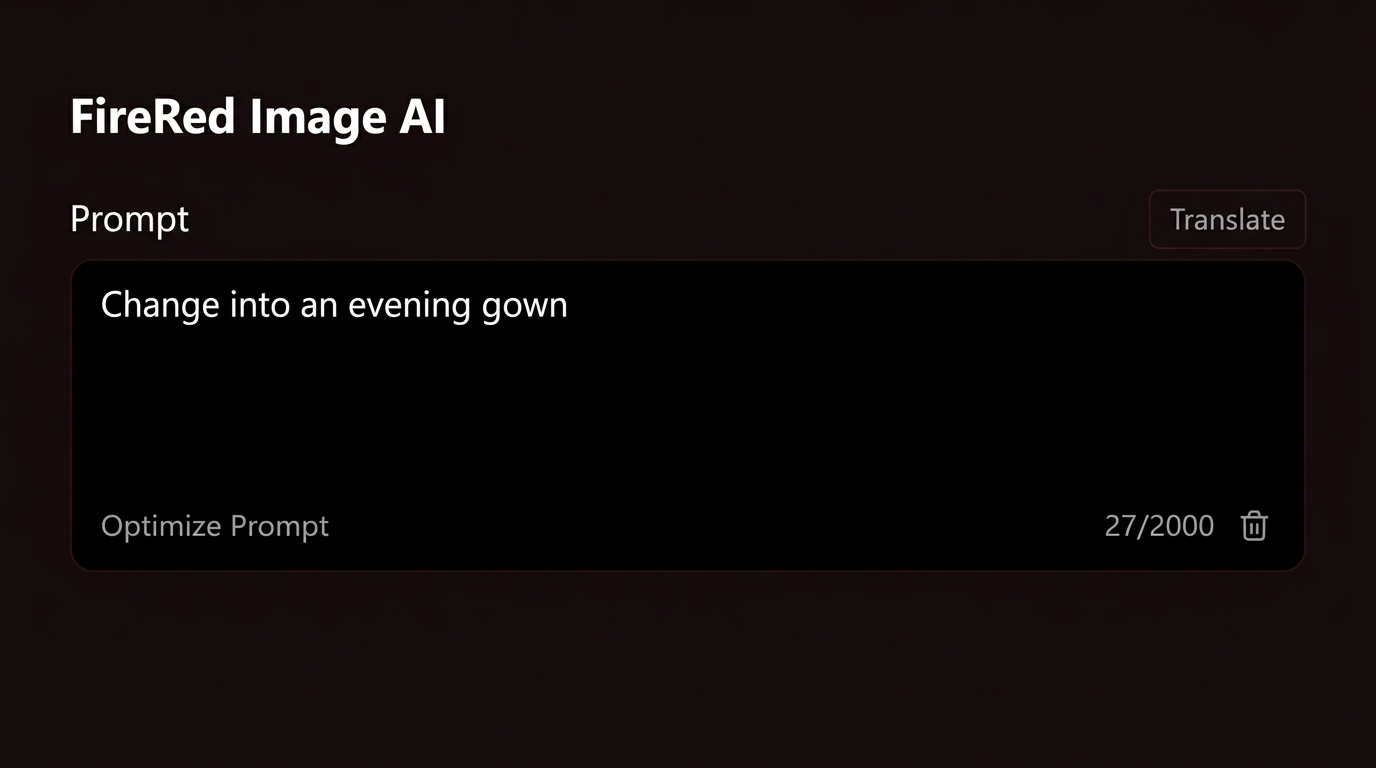
Step 1 — Describe and Provide References
Start with a highly descriptive text prompt and upload your reference images. FireRed natively supports 1 to 3 input images. You can mix text instructions with visual references, allowing the system to learn from your specific composition, visual effects, and style guidelines.
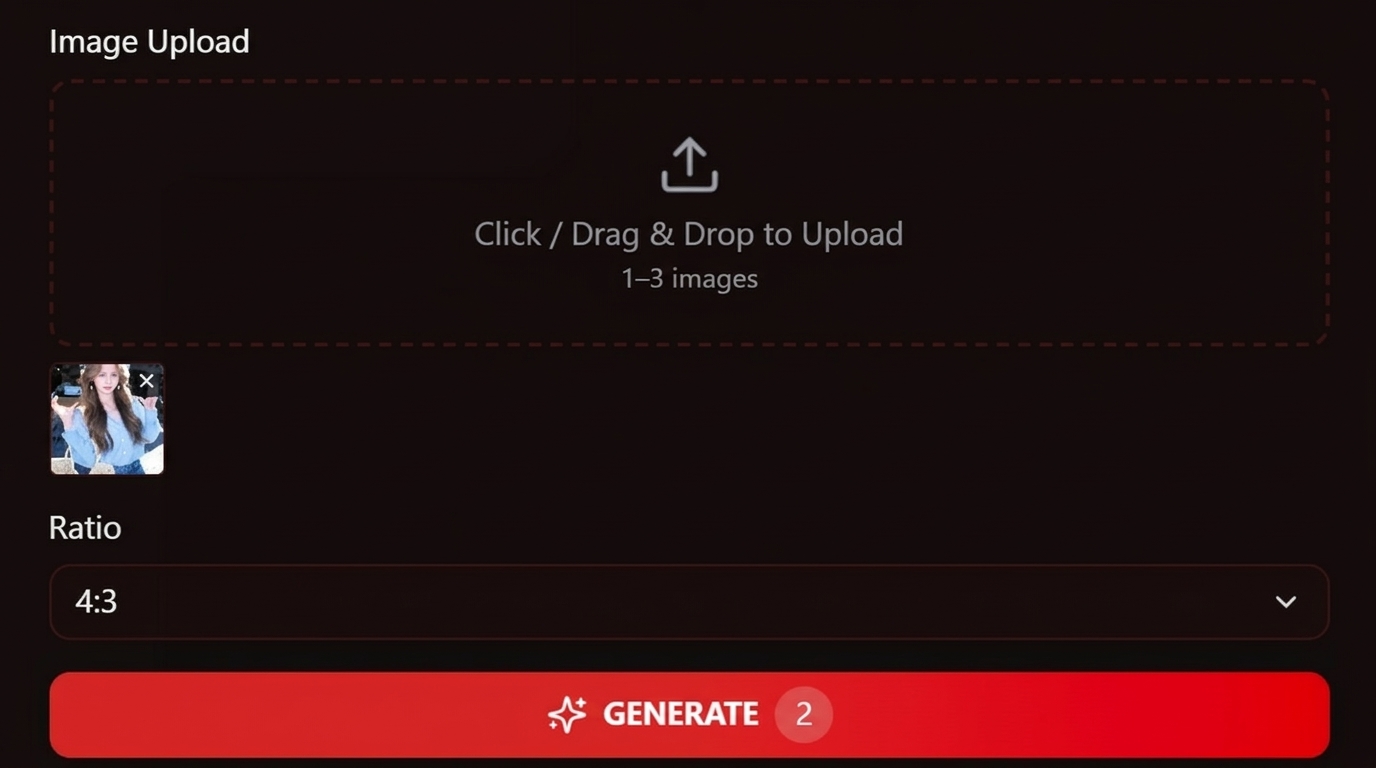
Step 2 — Generate and Utilize the Agent Module
Let the AI process your request. If you are using complex prompts or multiple images, FireRed's built-in Agent module performs region of interest (ROI) detection and image stitching. It can also utilize an LLM (like Gemini) to rewrite and optimize your instructions for better editing results before the final render.
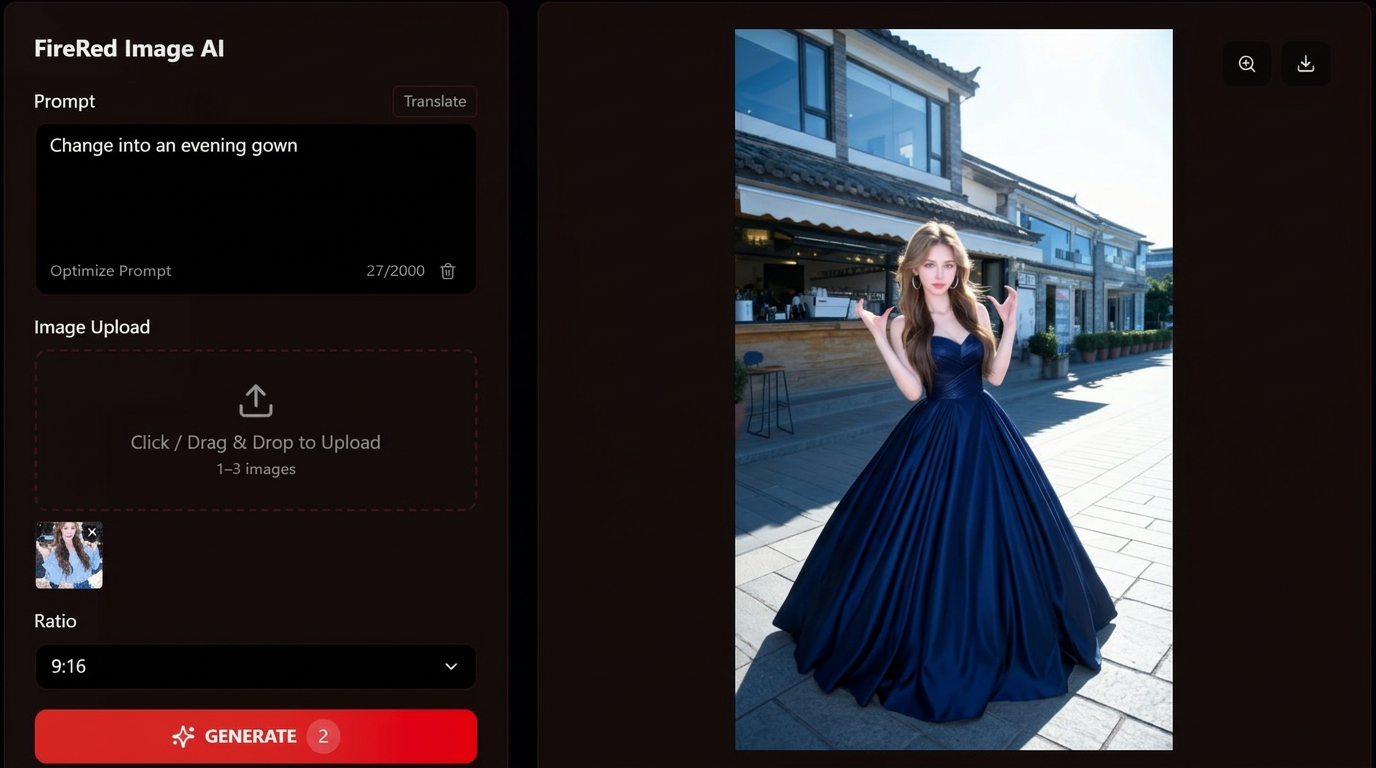
Step 3 — Export and Deploy
Download your final high-resolution image. Because the model operates under the Apache 2.0 license, you can use the output immediately for ads, social media, e-commerce, or commercial projects without worrying about unexpected licensing fees or copyright strikes.
5. Deep Dive: Key Features
FireRed is built for creators who care about reproducible results. Here is what makes it stand out in the crowded open-source AI landscape.
Advanced Multi-Image Fusion and Agent Module
FireRed breaks the limits of single-input creation. It natively supports up to three reference images for a single editing task. For more complex scenarios, its built-in Agent module enables multi-image preprocessing, region detection, and instruction refinement. This drastically improves visual consistency when merging elements like a specific character, a specific piece of clothing, and a specific background into one cohesive scene.
Native Bilingual Prompt Understanding
The model was trained to natively support both English and Chinese prompts. It demonstrates strong cross-lingual understanding, meaning users do not need to rely on external translation tools that might lose the nuance of creative instructions. You can seamlessly command the AI to add Chinese typography or understand complex English styling cues with equal accuracy.
6. Pricing & Value for Money
FireRed Image Edit delivers premium, industrial-grade capabilities without the enterprise price tag.
| Plan | Features |
|---|---|
| Free (Local) | $0. Includes full access to model weights, local deployment, bilingual prompt support, and an Apache 2.0 license for unrestricted commercial use. Requires a high-end GPU (24GB VRAM). |
| Cloud API | Pay-as-you-go. Available on platforms like Replicate (approx. $0.02 per run) and fal.ai (approx. $0.0325 per megapixel). Ideal for teams who prefer not to manage local hardware, offering lightning-fast generation (10-15 seconds) and priority processing. |
7. Alternatives & Competitors
The AI image editing landscape is becoming increasingly fragmented. Below is a head-to-head comparison between FireRed Image Edit, Seedream, and Nano Banana, focusing on real-world editing accuracy, text control, and production readiness.
| Quality dimension | FireRed Image Edit | Seedream | Nano Banana | Notes |
|---|---|---|---|---|
| Editing Accuracy | (5/5) | (4/5) | (3/5) | FireRed shows the most precise instruction-following in replace, add, and style-preserving edits |
| Text / Typography | (5/5) | (3/5) | (2/5) | FireRed reliably renders long English & Chinese text; others still hallucinate or distort characters |
| Identity Consistency | (5/5) | (4/5) | (3/5) | FireRed maintains facial structure and fine details across multi-step edits |
| Multi-Image Fusion | (5/5) | (4/5) | (2/5) | FireRed natively supports multiple references without fragile workarounds |
| Creative Control | (5/5) | (4/5) | (3/5) | FireRed offers the highest controllability for professional workflows |
| Ease of Use | (3/5) | (4/5) | (5/5) | Nano Banana is beginner-friendly; FireRed trades simplicity for precision |
| Commercial License | (5/5) | (3/5) | (2/5) | FireRed’s Apache 2.0 license allows unrestricted commercial use |
| Production Readiness | (5/5) | (4/5) | (3/5) | FireRed is optimized for advertising, e-commerce, and design pipelines |
Head-to-Head Takeaways
FireRed Image Edit
FireRed is built for professionals who demand exact text rendering, strict identity preservation, and reproducible results. Its open-source Apache 2.0 license and native multi-image fusion make it especially attractive for commercial teams and developers who need long-term stability and freedom.
Seedream
Seedream sits in the middle ground. It offers solid visual quality and a smoother learning curve than FireRed, but falls short in precise typography control and complex multi-reference editing, which limits its use in text-heavy or high-accuracy design tasks.
Nano Banana
Nano Banana prioritizes speed and simplicity. It is easy to use and accessible for casual creators, but lacks the fine-grained control, text reliability, and licensing clarity required for serious production or client work.
7.1 FireRed Image Edit vs. Seedream: Typography & Material Realism Showdown
We ran the same storefront poster edit through both tools under matching resolution and reference inputs to compare instruction-following, text integration, and material realism.
The Test Prompt: Design a storefront-style advertisement without any human subjects. Headline text: SEASONAL DISCOUNT. The text should appear professionally integrated into the scene. Emphasize glass surfaces, reflections, and lighting realism. Neon-inspired typography, dramatic side light, modern retail advertising style.
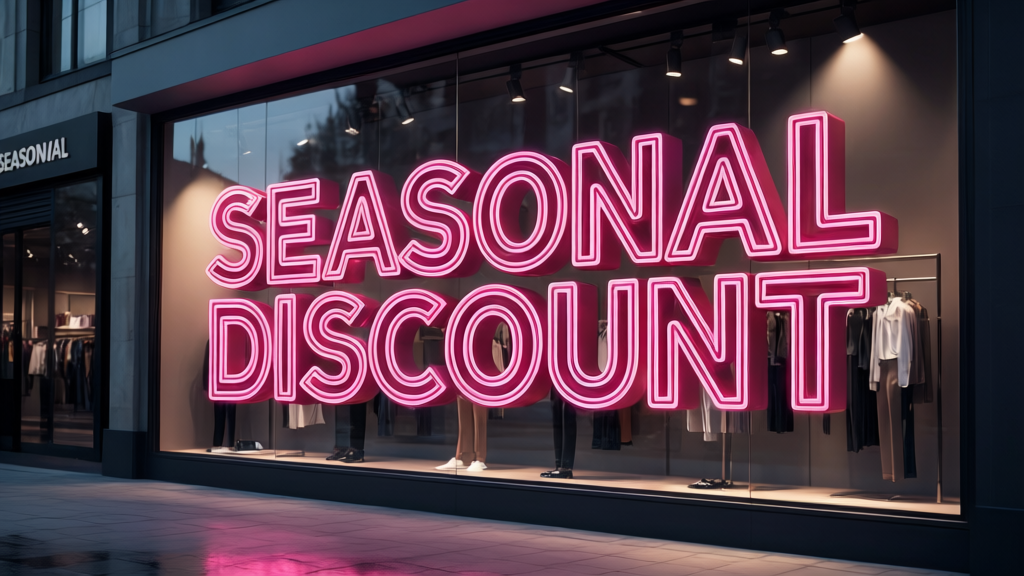
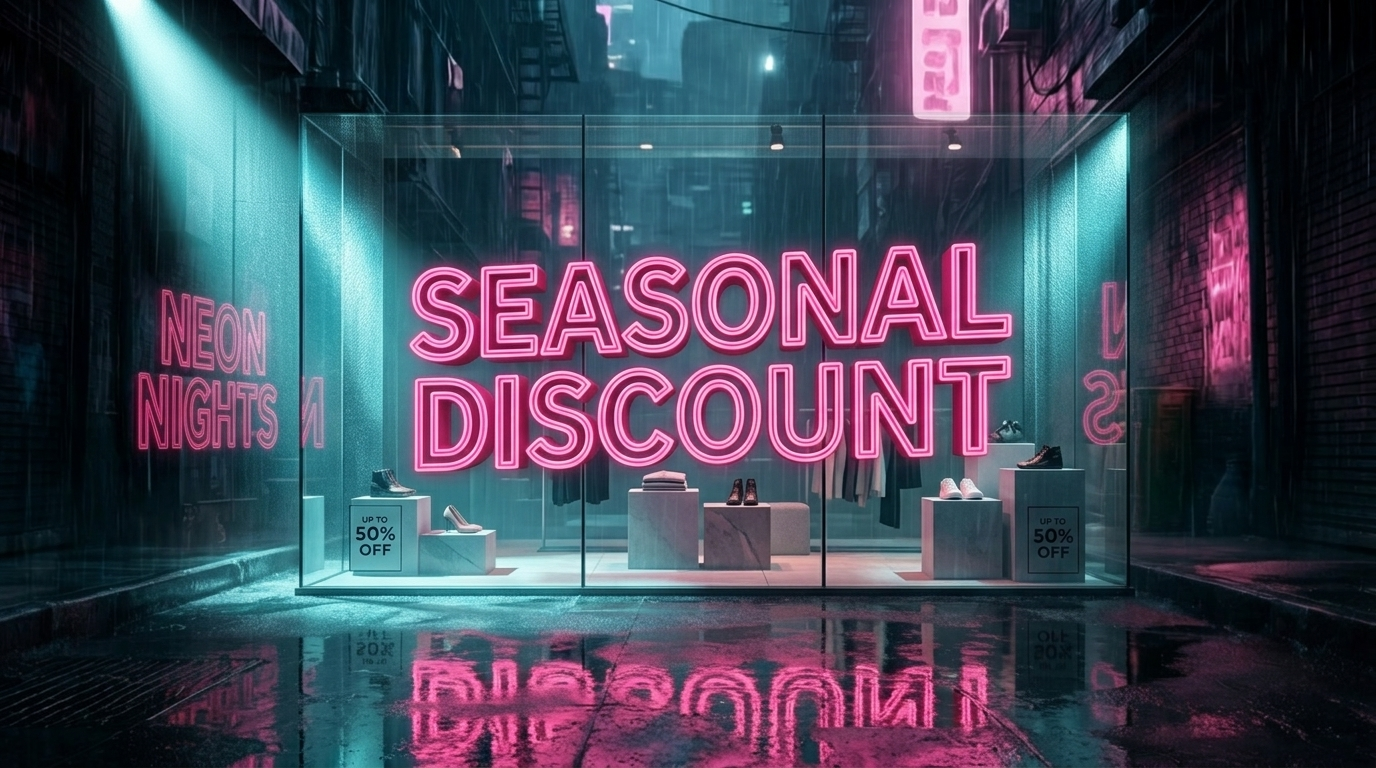
FireRed Image Edit Result: FireRed successfully integrated the typography directly into the environment. It accurately rendered "SEASONAL DISCOUNT" with crisp neon styling, while maintaining physically accurate glass transparency and realistic street reflections over the text.
Seedream Result: Seedream captured the dramatic lighting well, but struggled with environmental integration. The text appeared more like a flat digital overlay rather than a physical neon sign behind glass, and the lettering showed minor edge distortion.
The Verdict: For retail advertising where typography must interact seamlessly with physical materials (like glass reflections and neon glow), FireRed delivers a significantly more realistic and production-ready composite.
7.2 FireRed Image Edit vs. Nano Banana: Product Accuracy & Text Showdown
We put both tools to the test using a strict product advertising scenario. The goal was to update the background typography without distorting the commercial product itself—a common pain point for fast, beginner-focused AI tools.
The Test Prompt: Update the background signage to display the text "LIMITED EDITION". The glass perfume bottle and marble podium should stay exactly as they are. Maintain the realistic optical refractions through the glass and ensure the new neon lighting interacts naturally with the surrounding surfaces. Commercial studio quality, no human figures.


FireRed Image Edit Result: FireRed perfectly maintained the exact geometry of the perfume bottle and the marble texture. The text "LIMITED EDITION" was rendered flawlessly with crisp edges, and the neon glow cast physically accurate reflections onto the glass surface.
Nano Banana Result: While Nano Banana generated the image very quickly and produced a pleasing overall aesthetic, it struggled with strict control. The text contained a noticeable spelling hallucination (rendering as "LIMTED EDITON"), and the shape of the glass bottle slightly morphed, losing its original brand accuracy.
The Verdict: Nano Banana is excellent for quick, casual conceptual mockups where speed is the priority. However, for serious e-commerce and product advertising where brand assets cannot be altered and text must be perfect, FireRed offers the professional reliability required.
8. Final Conclusion: Should You Use It?
FireRed Image Edit is not designed as a casual, one-click image generator. Instead, it targets creators, developers, and design teams who need precise, controllable, and reproducible image editing. With its open-source availability, top-tier benchmark results on REDEdit-Bench, and reliable bilingual editing, it stands out as one of the most serious and capable image editing models available in 2026. If your workflow demands industrial-grade visual assets, FireRed is an essential addition to your toolkit.
9. Frequently Asked Questions
Common questions with direct answers. FAQPage schema is deployed for rich snippets.
Yes. The model weights and code are released under the Apache 2.0 license, which permits free use for both personal and commercial purposes.
A CUDA-capable NVIDIA GPU is strictly required for local deployment. For optimal performance and stable inference, an RTX 3090, RTX 4090, or professional-grade GPU with at least 24GB of VRAM is recommended.
Yes, the Apache 2.0 license explicitly allows commercial use. You can use the generated images for advertising, e-commerce, and client projects without paying royalties.
Yes. The model natively supports bilingual prompts, offering excellent comprehension in both English and Chinese.
You can run FireRed Image Edit via cloud inference platforms such as Replicate, fal.ai, and ModelScope, which charge small per-generation or per-megapixel fees.

FireRed Review Team
The FireRed Review Team consists of professional digital artists, AI researchers, and e-commerce marketers dedicated to testing and uncovering the most efficient creative technologies in the industry.